본 글에서 활용한 환경은 overleaf 웹사이트이며,
Overleaf, Online LaTeX Editor
An online LaTeX editor that’s easy to use. No installation, real-time collaboration, version control, hundreds of LaTeX templates, and more.
www.overleaf.com
에러 해결을 위해 아래 글들을 참고하였다.
What are underfull hboxes and vboxes and how can I get rid of them?
Often, TeX outputs underfull hbox and vbox warnings when running and in the generated log file. What are these and how can I get rid of them?
tex.stackexchange.com
Package hyperref Warning: Token not allowed in a PDF string (PDFDocEncoding)
When loading the hyperref package like: \usepackage[bookmarks,bookmarksnumbered]{hyperref} \hypersetup{colorlinks = true,linkcolor = blue,anchorcolor =red,citecolor = blue,filecolor = red,urlcolor...
tex.stackexchange.com
Latex 환경으로 논문을 작성하다보면 warning 메세지를 자주 만나게 된다.
일반적으로 이러한 warning 메세지는 pdf로 컴파일하는데 문제가 없어 무시하는 경우가 많다.
하지만, 간혹 저널을 제출하려고 할 때 해당 시스템에서 warning 메세지까지 문제로 삼는 경우가 있어 이를 해결해야 할 필요가 있을 때가 있다.
아래 그림을 보면, 나의 경우 log창을 펼쳤을 때 이렇게 많은 warning 메세지들이 존재함을 확인 할 수 있다.
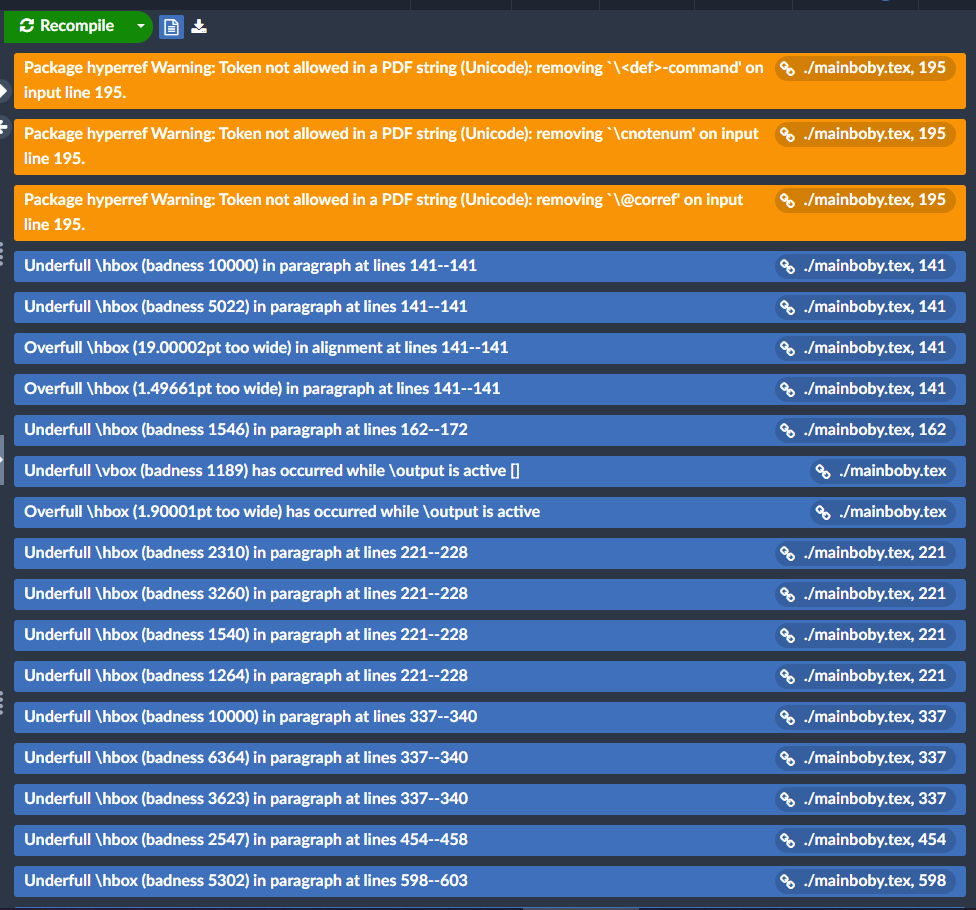
본 글에서는 이러한 warning들을 어떻게 해결했는지를 정리하고자 한다.
1. Package hyperref Warning:~~~
나의 경우, 아래와 같은 3개의 warning 메세지가 같은 라인에서 발생했다.
Package hyperref Warning: Token not allowed in a PDF string (Unicode): removing `\<def>-command' on input line
Package hyperref Warning: Token not allowed in a PDF string (Unicode): removing `\cnotenum' on input line
Package hyperref Warning: Token not allowed in a PDF string (Unicode): removing `\@corref' on input line
발생한 라인을 가보면 줄바꿈을 위해 공백으로 비워둔 라인인데 처음에는 이것 자체가 문제라고 생각하여 공백 라인 관련해서 해결해보려는 시도를 하였다.
하지만, 아무리 해봐도 해결이 되지 않았고 이 라인 자체가 문제가 있는 것이 아님을 알 수 있었다.
해결을 위해서는 .tex 파일 상단에 보통 \begin{document} 하기 전에 \usepackage를 통해 필요한 패키지들을 정의하는 부분에 아래 라인들을 추가하면 된다.
\usepackage[bookmarks,bookmarksnumbered]{hyperref}
\hypersetup{colorlinks = true, linkcolor = blue, anchorcolor = red, citecolor = blue, filecolor = red, urlcolor = red,
            pdfauthor=author}
하이퍼링크 관련해서 세팅을 할 때 pdfauthor=author 를 추가해줘야 하는 것이 핵심이다.
2. Underfull \hbox ~~~, Overfull \hbox ~~~, Underfull \vbox ~~~, Overfull \vbox ~~~
나의 경우, 아래 메세지들을 비롯해 이와 관련해서 많은 메세지들이 발생하고 있었다.
Underfull \hbox (badness 10000) in paragraph at lines
underfull, overfull 에러는 warning 메세지까지는 아니더라도 어쨌든 문제가 발생한 부분이니 해결이 필요하다.
해결을 위해서는 1번 문제와 마찬가지로 .tex 파일 상단에 보통 \begin{document} 하기 전에 \usepackage를 통해 필요한 패키지들을 정의하는 부분에 아래 라인들을 추가하면 된다.
\hbadness=99999  % or any number >=10000
\vbadness=99999  % or any number >=10000
\hfuzz=20pt
underfull hbox 에러를 해결하려면, \hbadness
underfull vbox 에러를 해결하려면, \vbadness
overfull hbox 에러를 해결하려면, \hfuzz
overfull vbox 에러를 해결하려면, \vfuzz
값을 설정해주면 되고, 설정 할 때는 메세지에서 뜬 값보다 더 큰 값으로 설정해주면 된다.
참고로 나의 경우 hfuzz도 처음에는 99999로 설정하였으나, 에러 메세지가 떠서 메세지의 뜬 값보다 약간 더 큰 값인 20으로 설정하였다.
위와 같이 해결하였을 때, 아래와 같이 warning메세지들이 대부분 사라진 것을 확인 할 수 있었다.

현재 남아있는 warning 메세지는 \end{frontmatter} 부분에서 발생하는데,
이는 아직 해결하지 못하였다.